Every teacher knows that lesson planning can eat up valuable time, especially as demands grow and classrooms evolve in 2026. Staying organized and efficient is more challenging than ever. That is why having the right lesson templates is crucial for educators who want to save time and focus on impactful teaching.
In this article, you will discover the top 7 lesson templates designed to help you streamline your workflow, stay organized, and improve instructional quality. Whether you prefer digital planners or collaborative tools, you will find practical insights to support any grade level. Explore how these solutions can transform your planning and teaching experience.
Why Lesson Templates Are Essential for Modern Teachers
Modern classrooms demand efficiency, adaptability, and high-quality instruction. Lesson templates have become indispensable for teachers striving to meet these expectations while managing ever-increasing responsibilities.
The Growing Complexity of Teaching in 2026
Teaching in 2026 is more complex than ever. Curriculum standards have expanded, and student needs are increasingly diverse. Many educators balance in-person, hybrid, and remote learning environments, each with unique planning challenges.
Administrative tasks and reporting requirements continue to grow. Teachers must produce detailed plans, document interventions, and demonstrate alignment with standards. Consistency and instructional quality are essential, but they are difficult to maintain without reliable lesson templates.
Time-Saving and Organizational Benefits
Lesson templates are proven time-savers. By reducing repetitive planning, teachers can reclaim hours each week for instruction and student support. Templates provide a clear structure, minimizing the risk of missing important lesson components.
Research shows that teachers using effective lesson templates often report up to 50 percent less planning time. For a practical guide to streamlining each planning step, explore How to Plan a Lesson Step-by-Step. This approach not only boosts productivity but also reduces stress.
Enhancing Instructional Quality and Student Outcomes
Well-designed lesson templates elevate instructional quality. They offer frameworks for differentiated instruction, clear learning objectives, and formative assessments. This consistency helps teachers align lessons with standards and track progress toward learning goals.
Schools that have adopted lesson templates have observed improved lesson delivery and greater student engagement. By supporting structured planning, these tools help teachers focus on what matters most: student learning.
Adaptability and Collaboration
Digital lesson templates enable real-time collaboration among teaching teams. With platforms like Google Docs and Notion, co-teachers and substitutes can access, edit, and adapt plans instantly.
Templates are highly customizable, allowing teachers to tailor content for different subjects, grade levels, and instructional styles. This flexibility ensures that lesson templates support both individual creativity and collective consistency.
Supporting New and Veteran Teachers Alike
Lesson templates benefit teachers at every stage of their careers. New educators gain confidence from guided frameworks, while experienced teachers speed up established routines.
Templates also serve as professional development tools, supporting ongoing instructional improvement and reflective practice. Whether used for onboarding, mentoring, or refining best practices, lesson templates create a foundation for teaching excellence.
How to Choose the Right Lesson Template for Your Classroom
Selecting the best lesson templates for your classroom can transform your planning routine and improve student outcomes. With so many options available in 2026, making the right choice requires careful consideration of your unique teaching context, workflow, and goals. Let us break down the process into manageable steps.
Assessing Your Teaching Needs and Style
Start by reflecting on your specific classroom environment. Are you teaching elementary, middle, or high school? Do you manage multiple subjects or focus on a single area? Your grade level and subject inform the type of lesson templates that will be most effective.
Next, consider your planning preferences. Some educators thrive with digital planners that sync across devices, while others prefer the tactile feel of paper. Decide if you need daily, weekly, or unit-based lesson templates to match your workflow.
Key Features to Look For
Not all lesson templates are created equal. Prioritize templates that offer customizability, allowing you to adjust sections for your teaching style. User-friendly designs save time and reduce frustration. Look for compatibility with your school’s systems, such as calendar or grading software.
Collaboration is another key feature. If you work with co-teachers or often have substitutes, templates that allow easy sharing and editing are invaluable. Integration with progress tracking tools can further streamline your experience with lesson templates.
Evaluating Template Formats and Platforms
Compare the main platforms for lesson templates to find what fits best. Google Docs and Notion offer flexibility and cloud access, while printable PDFs are ideal for offline use. Specialized apps may provide advanced features, but consider device compatibility and ease of onboarding.
Here is a quick comparison:
| Format | Accessibility | Customization | Offline Use |
|---|---|---|---|
| Google Docs | High | Moderate | Limited |
| Notion | High | High | Limited |
| Printable PDFs | Moderate | Low | High |
| Apps | Varies | High | Varies |
Choose a platform that aligns with your daily habits and comfort with technology, ensuring your lesson templates support seamless planning.
Cost Considerations and Value
Budget plays a role in selecting lesson templates. Free options are widely available and often meet basic needs. Paid or premium templates may offer advanced features, such as analytics, integrations, or professional designs.
Weigh the return on investment. If a premium template saves hours each week or raises instructional quality, the cost may be justified. Many teachers report that the right lesson templates pay for themselves through efficiency and better lesson delivery.
Real-World Examples and Teacher Testimonials
Learning from peers can clarify your decision. Educators who have adopted effective lesson templates often share positive outcomes, such as reduced planning time and improved organization. For instance, teachers using Notion or Google Docs templates in 2024-2025 saw them become some of the most downloaded resources.
To see practical examples and find inspiration, explore Sample Lesson Plan Examples, where real teachers showcase how different templates work in varied classroom settings.
Hearing how others benefit can help you identify which lesson templates will have the greatest impact in your own planning routine.
Top 7 Lesson Templates for Teachers to Streamline Planning 2026
In 2026, lesson templates are the backbone of efficient teaching. With evolving classroom needs and digital transformation, the right template can save hours each week while improving lesson quality. Whether you seek a digital planner, print-ready format, or collaborative tool, the options below represent the best lesson templates for every teaching context.
To help you compare quickly, here is a summary table of the top 7 lesson templates for this year:
| Template Name | Platform | Pricing | Best For | Notable Feature |
|---|---|---|---|---|
| Lesson Plan Organizer – Notion | Notion | Free | All grade levels | Customizable, all-in-one |
| 3 Column Lesson Plan – Google Docs Templates | Google Docs | Free | K-12, daily lessons | Simple, printable |
| Teacher OS – Lesson Planning & Classroom Management (Notion) | Notion | $29 | Middle/high, dept. heads | Dashboard, progress tracking |
| Basic Weekly Lesson Plan Overview – Google Docs Templates | Google Docs | Free | Weekly planners | Visual overview |
| Student and Lesson Planner – Notion | Notion | Free | Multi-class teachers | Progress & lesson tracking |
| Lesson Plan with Subject, Activities, Task List and Notes – Google Docs Templates | Google Docs | Free | Detailed documentation | Task lists & notes |
| Unit & Lesson Outline – Notion | Notion | Free | Curriculum designers | Unit & daily mapping |
Lesson Plan Organizer – Notion
The Lesson Plan Organizer for Notion is a favorite among teachers who crave clarity and flexibility. This template centralizes lesson planning, offering customizable sections for objectives, activities, materials, and assessments.
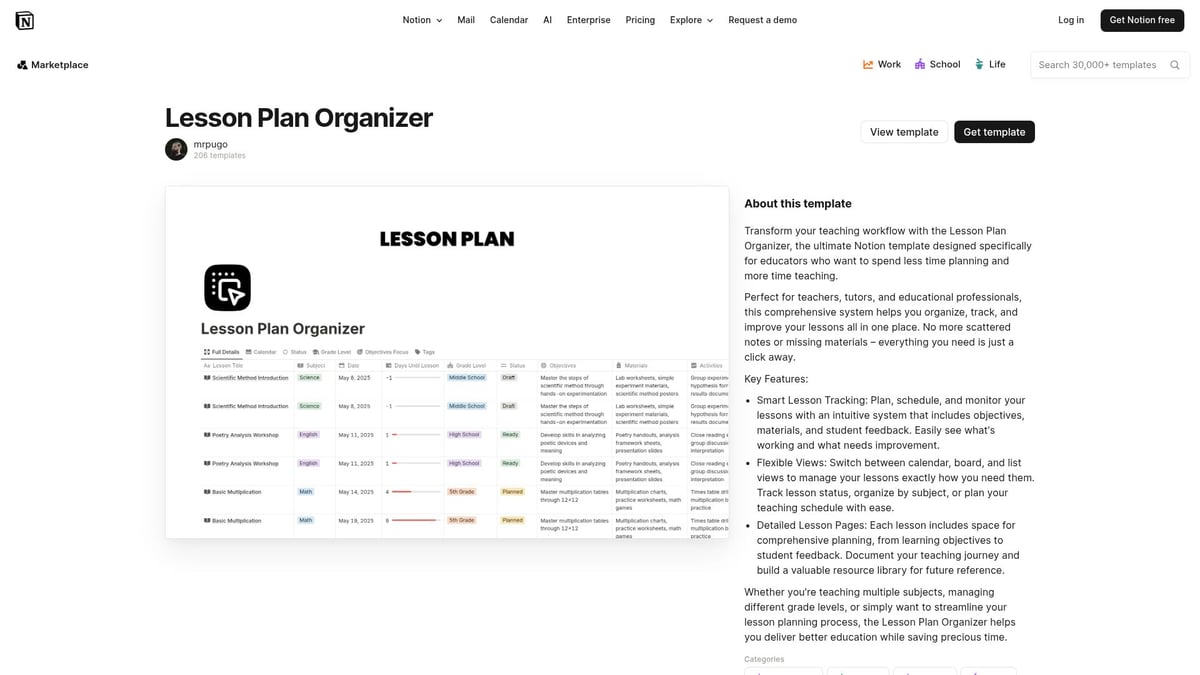
You can easily duplicate content for recurring units, saving time on repetitive work. The drag-and-drop interface makes organizing lesson templates intuitive, while multimedia support allows for attaching videos, links, and images directly to each plan.
This tool integrates seamlessly with Notion’s database and calendar features. Teachers who use it praise the collaborative capabilities, allowing co-teachers or substitutes to access and edit lesson templates in real time.
Pros: Highly flexible, collaborative, cloud-based.
Cons: Requires a Notion account, some learning curve for beginners.
Thousands of teachers across grade levels rely on this solution to streamline their weekly and unit planning. Lesson templates like this serve as a foundation for instructional consistency and efficiency.
3 Column Lesson Plan – Google Docs Templates
For those who value simplicity, the 3 Column Lesson Plan template in Google Docs is a classic. Its three-column structure—objectives, activities, assessments—keeps lesson templates straightforward and standards-aligned.
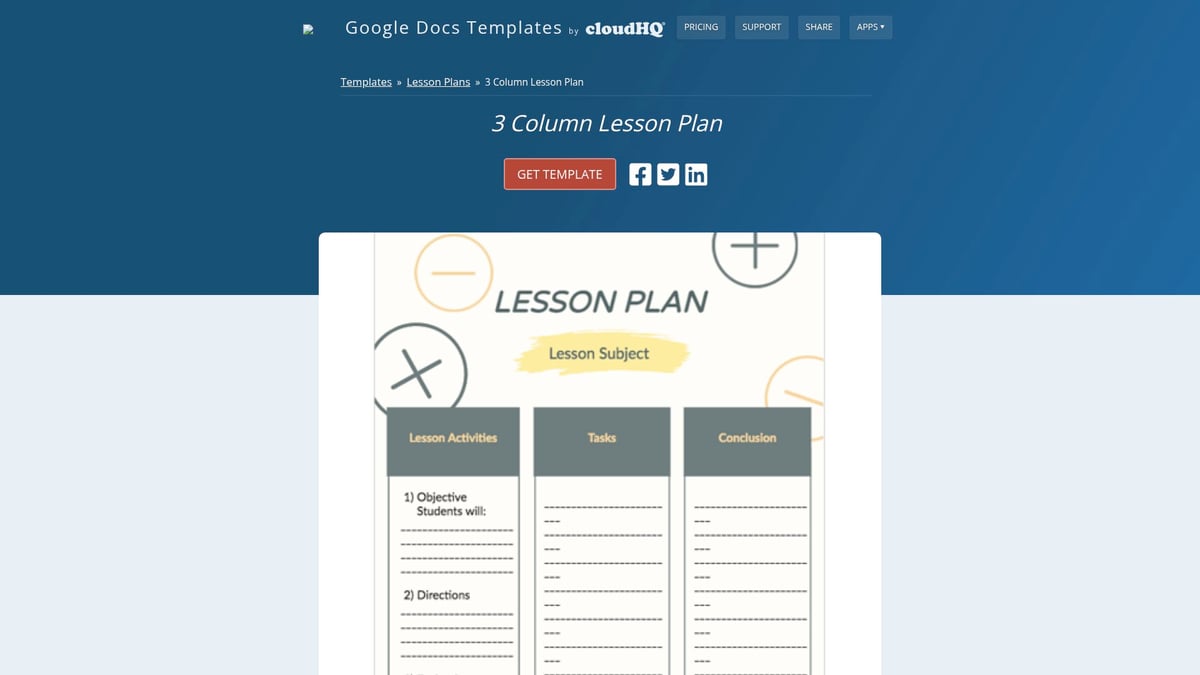
This template is especially popular among K-12 teachers who need a printable, shareable format. You can quickly duplicate and adapt the lesson template for daily or weekly use, ensuring nothing gets overlooked in your planning process.
It works seamlessly with Google Drive, offering instant access from any device. Teachers report that lesson templates in this style help maintain focus on core instructional goals.
Pros: No learning curve, printable, easy sharing.
Cons: Limited customization, basic visual appearance.
Elementary teachers often use this lesson template to break down each day’s learning, making it easier to prepare substitutes or collaborate with colleagues.
Teacher OS – Lesson Planning & Classroom Management (Notion)
Teacher OS for Notion is a powerhouse that blends lesson planning with classroom management. This paid template ($29 one-time) offers an all-in-one dashboard for lessons, student progress, and resource tracking.
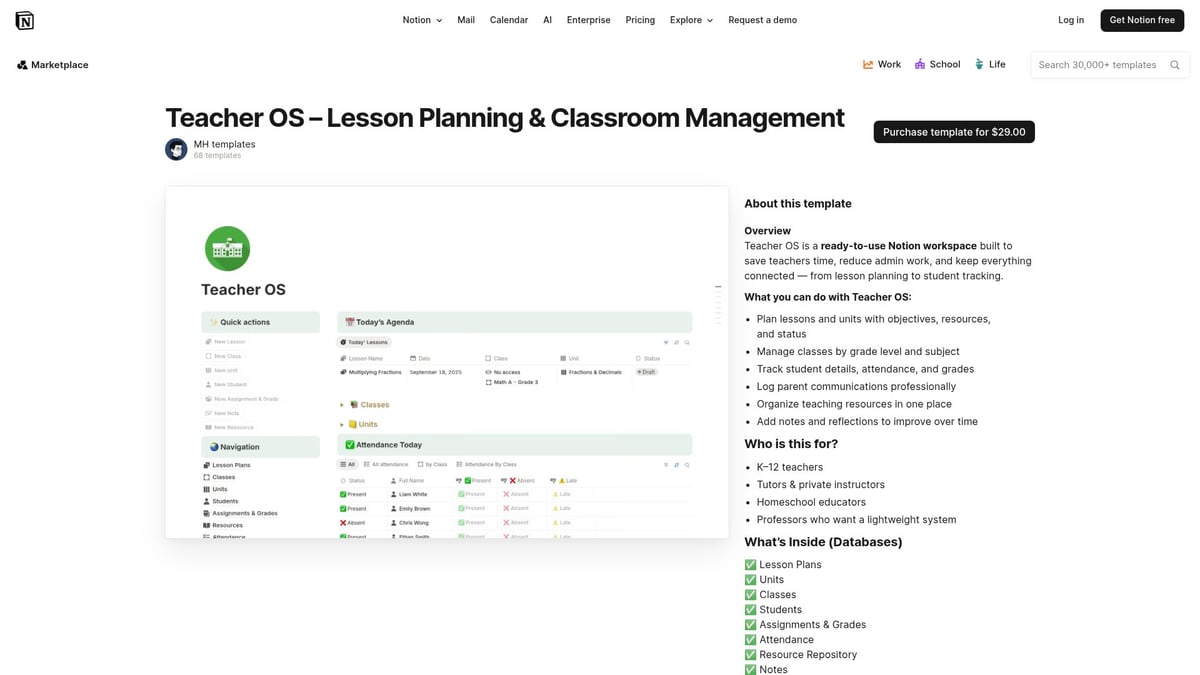
You can monitor assignments, attendance, and tasks—everything from a single workspace. Lesson templates within Teacher OS are highly customizable, supporting advanced organization for middle and high school teachers.
Department heads and team leaders appreciate the collaborative features. The template is designed for seamless integration with Notion’s ecosystem, making it a top pick for educators who manage multiple classes or teams.
Pros: Comprehensive, advanced organization, supports collaboration.
Cons: Paid, requires familiarity with Notion.
In practice, Teacher OS is used to coordinate team planning and streamline classroom logistics, reinforcing the importance of robust lesson templates in modern education.
Basic Weekly Lesson Plan Overview – Google Docs Templates
If you need a bird’s-eye view, the Basic Weekly Lesson Plan Overview in Google Docs is ideal. This template offers a grid format to map out subjects, objectives, and activities for the week.
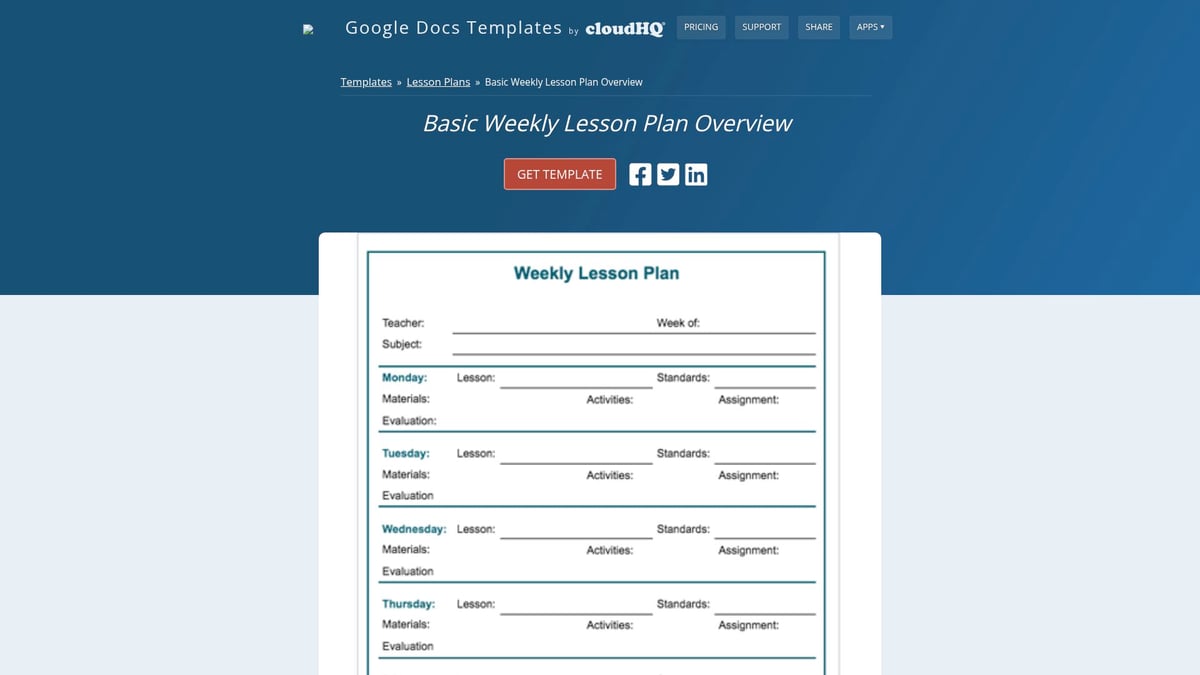
Lesson templates like this help teachers visualize the entire week at once, making it easier to plan for block schedules or coordinate with resource specialists. The editable and printable nature of this template supports quick adjustments as schedules shift.
While it might lack the detail of daily lesson templates, its strength lies in providing structure for multi-class or multi-subject planning. Many resource teachers rely on this format to align interventions across classrooms.
Pros: User-friendly, printable, adaptable.
Cons: Not detailed for daily planning, basic design.
This lesson template is a go-to for educators who need to balance multiple responsibilities while maintaining clarity and organization.
Student and Lesson Planner – Notion
The Student and Lesson Planner for Notion is designed for teachers juggling multiple classes or subjects. This free template combines lesson templates with student progress tracking, bringing everything together in a unified workspace.
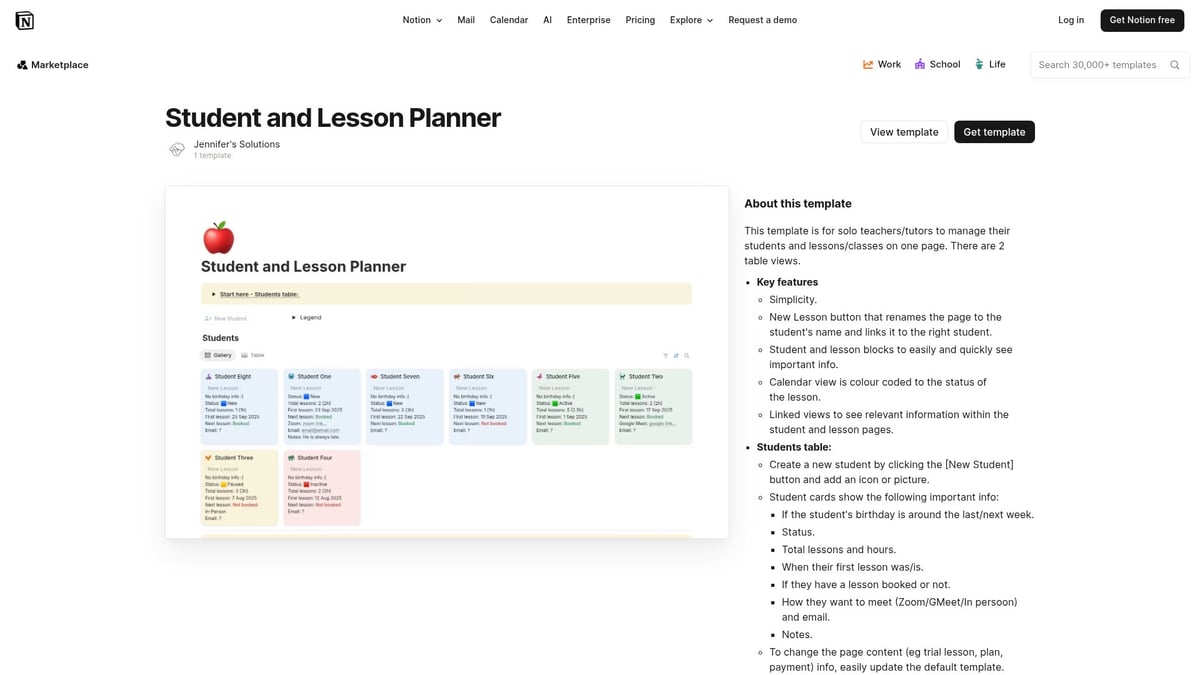
You can log assignments, attendance, and lesson objectives, using Notion’s tracking tools for real-time updates. The template is fully customizable, allowing you to tailor sections for specific needs or teaching styles.
Secondary teachers find this lesson template especially valuable for monitoring lesson pacing and ensuring alignment with curriculum goals. The digital-only format supports efficient data management and progress analysis.
Pros: Integrates with Notion’s tools, customizable, holistic view.
Cons: Requires digital setup, Notion account needed.
By consolidating lesson templates and student data, this solution helps teachers save time and enhance instructional quality.
Lesson Plan with Subject, Activities, Task List and Notes – Google Docs Templates
For thorough documentation, this Google Docs template delivers. It features dedicated sections for subject, activities, task lists, and notes, supporting detailed lesson templates for each class session.
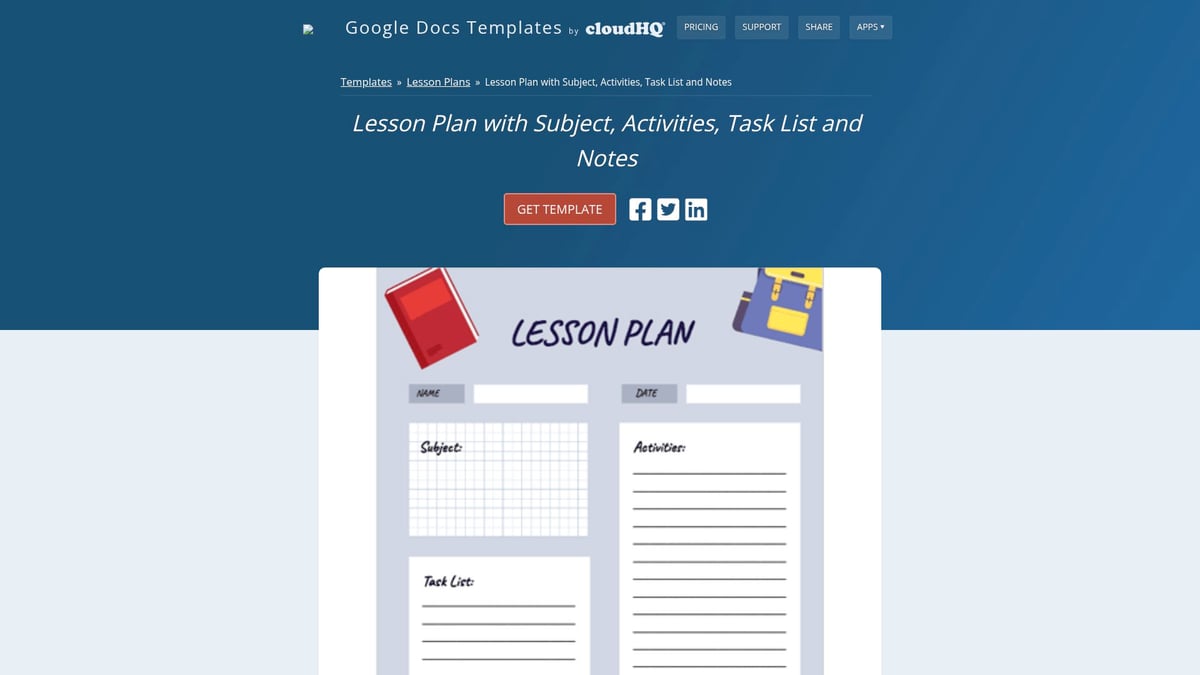
Teachers can print or edit the template online, making it flexible for both digital and traditional workflows. The inclusion of task lists and notes enables comprehensive lesson records, which are vital for substitute teaching and lesson observations.
While it may be time-intensive to complete daily, the depth of information captured is unmatched. Many educators use this lesson template for peer reviews and professional development.
Pros: Printable, editable, supports thorough planning.
Cons: Can be time-consuming for everyday use.
Lesson templates of this depth ensure that every aspect of instruction is carefully considered and documented.
Unit & Lesson Outline – Notion
The Unit & Lesson Outline in Notion is perfect for curriculum designers or teachers developing new courses. This template offers a framework for mapping entire units alongside individual lesson templates, ensuring alignment from big-picture goals to daily objectives.

It supports backward design, helping educators start with end goals and build lessons that scaffold student learning. The collaborative features allow curriculum teams to co-create and revise lesson templates efficiently.
Though digital-only, this template’s flexibility and long-term view make it a favorite for course redesigns and cross-grade planning. Customization options support a range of subjects and grade levels.
Pros: Supports long-term planning, highly customizable, collaborative.
Cons: Requires Notion platform, digital only.
Curriculum teams adopting this lesson template report improved coherence and focus across instructional units.
As lesson templates become more sophisticated, digital platforms like Notion and Google Docs continue to lead the way. For educators interested in exploring the next generation of planning tools, consider reviewing the Best AI Lesson Planning Tools to discover how artificial intelligence is shaping the future of efficient, data-driven lesson templates.
Tips for Maximizing the Impact of Lesson Templates
Teachers can unlock powerful benefits by using lesson templates strategically. With thoughtful customization and integration, these tools become more than just time-savers—they drive instructional excellence and collaboration. Explore these practical tips to make the most of your lesson templates in any classroom setting.
Customization for Your Classroom
Adapting lesson templates to your specific classroom needs is essential for meaningful planning. Start by reviewing each template and tailoring sections to match your subject, grade level, and student demographics.
- Add extra fields for differentiation or special projects.
- Remove irrelevant parts to avoid clutter.
- Adjust the sequence of activities to support your teaching style.
Personalizing lesson templates ensures they align with your instructional goals and help you address unique student needs.
Integrating Templates with Digital Tools
Maximize efficiency by connecting lesson templates with digital platforms. Sync templates to your calendar, grading system, or communication apps for seamless workflow. Cloud-based tools allow for instant updates and collaboration, keeping your plans accessible anywhere.
Leverage the power of AI-driven platforms to further streamline lesson creation. For example, GenAI in Lesson Planning demonstrates how generative AI can help teachers customize lesson templates rapidly, saving time and enhancing lesson quality.
Encouraging Student-Centered Planning
Design lesson templates to support student engagement and ownership. Include sections for student feedback or self-assessment, and offer options for choice-based activities.
- Add reflection prompts for students at the end of each lesson.
- Create space for student-generated questions or ideas.
- Incorporate checklists for self-monitoring progress.
When lesson templates support student voice, planning becomes more dynamic and responsive.
Collaborating with Colleagues
Boost consistency and peer support by sharing lesson templates with your teaching team. Collaborative platforms like Google Docs and Notion make it easy to co-develop, edit, and distribute plans.
Consider exploring additional resources such as Free Homeschool Lesson Plans to discover templates that can be adapted for team use. Exchanging templates helps build a strong professional community and reduces individual workload.
Regular Review and Reflection
Schedule time each term to review and refine your lesson templates. Gather feedback from students and colleagues to identify which sections are most helpful or need improvement.
Tracking how lesson templates impact classroom outcomes can guide adjustments. Continuous reflection ensures your planning remains effective and aligned with evolving goals.
Staying Updated with New Template Releases
Stay current by monitoring platforms for new and trending lesson templates. Join educator forums and online communities to exchange best practices and discover innovative solutions.
- Subscribe to newsletters from template providers.
- Attend webinars or workshops focused on lesson planning.
- Participate in professional learning networks.
Keeping your toolkit fresh ensures you always have the best resources at your fingertips.
Avoiding Common Pitfalls
To get the most from lesson templates, keep them simple and user-friendly. Overly complex formats can slow you down or stifle creativity.
- Avoid rigid structures that limit adaptability.
- Regularly check that templates support rather than hinder your planning process.
By focusing on clarity and flexibility, lesson templates remain powerful allies in your teaching journey.
Frequently Asked Questions About Lesson Planning Templates
Educators often have many questions about lesson templates as they look to modernize their planning process. Below, we address the most common concerns and considerations, helping teachers make informed choices that maximize both efficiency and instructional quality.
What are the main differences between digital and printable templates?
Digital lesson templates offer accessibility from any device, easy sharing, and real-time collaboration. Printable templates are tangible, require no tech skills, and work well for quick edits.
| Feature | Digital Templates | Printable Templates |
|---|---|---|
| Accessibility | Any device, anywhere | Physical, classroom only |
| Collaboration | Real-time, multi-user | Manual sharing |
| Customization | High, with integrations | Limited to pen/paper |
Teachers often choose digital lesson templates for team teaching and remote work. Printable options remain popular for quick, offline planning.
Are free templates as effective as paid ones?
Free lesson templates are widely available and can suit most planning needs, especially for standard formats. Paid templates may offer advanced features, such as integration with management systems, analytics, or exclusive designs.
Effectiveness depends on your specific requirements and willingness to invest. Many teachers report that free lesson templates provide substantial value, while others find premium versions save additional time and offer enhanced support.
How can templates support substitute teachers and co-teaching?
Lesson templates ensure continuity when a substitute steps in or when collaborating with other teachers. Clear structure, objectives, and activity breakdowns mean substitutes can follow the plan without confusion.
Collaborative platforms let co-teachers edit and update lesson templates together in real time. This results in smoother transitions and consistent learning experiences for students, regardless of who is leading the class.
What security and privacy considerations should teachers be aware of?
When using digital lesson templates, always review the platform's privacy settings and data policies. Protect student information and restrict access to sensitive documents.
Platforms like Notion and Google Docs offer options to control who can view or edit your lesson templates. Regularly update passwords and train staff on best practices for digital safety to minimize risks.
Can templates be used across different subjects and grade levels?
Absolutely. Most lesson templates are designed for adaptability. Teachers can modify sections to match specific content, grade-level expectations, and instructional strategies.
For example, a science teacher might add experiment details, while a language arts teacher could focus on reading objectives. This flexibility makes lesson templates a valuable asset for any educator.
How do I get started with a new template platform?
Begin by exploring tutorials or official guides for your chosen platform. Set up a basic lesson template, then gradually customize it to reflect your workflow.
Seek feedback from colleagues who already use these tools. Consider reading research like the Teacher Planning Time Analysis to understand how effective planning habits can support your transition.
Where can I find more lesson planning resources?
Look for educator communities, template marketplaces, and official documentation for platforms like Google Docs and Notion. Many teachers also share successful lesson templates in forums or professional networks.
Regularly updating your library of lesson templates ensures you stay organized and responsive to new teaching challenges. Engaging with these resources will help you refine your planning process over time.
As you explore these top lesson templates to streamline your planning for 2026, imagine how much more you could accomplish with tools that adapt to your unique teaching style and your students’ needs. With LearnSpark, you can take organization and personalization even further—guiding each child’s learning journey while saving time for what matters most. If you’re ready to experience adaptive lesson planning, progress tracking, and seamless integration for worldschooling or traditional classrooms alike, why not take the next step?
Create Your Free Account
and see how easy it can be to elevate your teaching with confidence.